

Cracking NTLM passwords with Amazon's P3 16x Tesla v100 EC2 Cracking + Hashcat 4.0
- Deep Security

- Mar 9, 2020
- 2 min read
Migrated from our other blog

“Using AWS Services for password cracking!”
Amazon just released their EC2 P3 instances on Oct 25th, 2017, which itself contains 4x or 8x Nvidia Tesla V100's. Our purpose for this was to demonstrate how to create an on-demand password cracker and just rent it by the hour as needed for certain engagements once hashes have been retrieved, even add to it a cloud cluster using Elcomsoft Distributed Password Recovery instead of purchasing many 1080ti's plus power and cooling cost factors.
Currently in use is locally on premise is
-- 2x Intel Xeon 2699-v3 36 cores, 72 CPUs both water-cooled
-- 128GB DDR 4 ECC memory
-- Samsung 960 m.2 as a boot drive
-- Raid 5 volume - 4x 1TB SSD's + PCI-E 3.0 Raid controller
-- 1x GTX 1080 water-cooled MSI Seahawk or 2x GTX 1080ti, not water-cooled MSI and Zotac AMP Extreme edition
Currently below, are steps taken locally, to crack some NTLM passwords using Hashcat
-O = Enable optimized kernels (limits password length) -o = Outputs cracked passwords to Found_passwords.txt -w 3 = High performance mode -a3 = Attack mode 3 which is brute force -m 1000 = Specifies type of hash being cracked
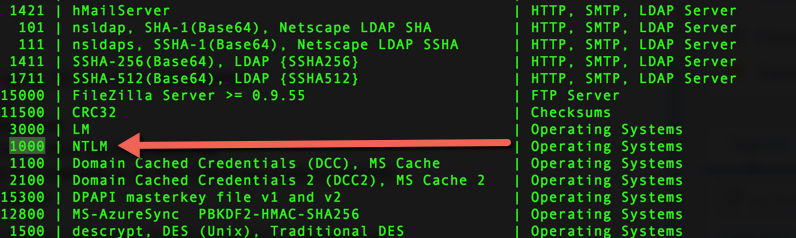
hashes.txt = Source of hashes to be cracked
D:\hashcat-4.0\0_PW_LISTS\*.* = Location of wordlists to use and attempt
Policygen --minlength=8 --maxlength=14 --mindigit=1 --minlower=1 --minupper=1 --maxspecial=1 -o Client_x.masksUse Hashcat and crunch through our nearly +400GB of and wordlists via the GPUs power
Hashcat64.exe -O -o Found_passwords.txt -w 3 -m 1000 hash.txt D:\hashcat-4.0\0_PW_LISTS\*.*
Basic password variation of masks such as command
Hashcat64.exe -O -o Found_passwords.txt -w 3 -m 1000 hash.txt -a3 ?u?l?l?l?l?l?a?a?a?a?a?a
Resort to custom masks for Hashcat using policygen to create the password masks and apply some brute forcing depending on the timings such as
Policygen --minlength=8 --maxlength=14 --mindigit=1 --minlower=1 --minupper=1 --maxspecial=1 -o Client_x.masks


Last resort will be to use some brute force methods for the NTLM hases
Hashcat64.exe -O -o Found_passwords.txt -w 3 -m 1000 hashes.txt -a3

To get set up on Amazon's EC2 instances you first need to ensure
Ensure that you have enough credits in your account to deploy these, if not call back into support and have them update "Spot Requests" NOT "Instances"Have an Amazon EC2 accountMake sure through support your account is provisioned for Spot instances in the regions you will be deploying these in

The price on for an on-demand instance for a P3 x16 is about 25$ an hour but if you use a Spot Requests you can get it for 4-8$ an hour!!!
Use the following settings below for creating the Spot Request


Once instance is fulfilled and up and running ssh in, run the following commands
sudo su - sudo apt-get update && apt-get -y sudo apt-get install linux-headers-$(uname -r) lspci to display PCI hardware info detection

wget http://developer.download.nvidia.com/compute/cuda/repos/ubuntu1404/x86_64/cuda-repo-ubuntu1404_6.5-14_amd64.deb
sudo dpkg -i cuda-repo-ubuntu1404_6.5-14_amd64.deb
sudo apt-get install cuda -y
Some commands to validate the nvidia drivers are installed
Nvidia-smi

Hashcat -I ( i as in insight )


sudo apt-get install p7zip-full -y
7z x hashcat-4.0.0.7z
cd 7z x hashcat-4.0.0
./hashcat64.bin -O -o Found_passwords.txt -w 3 -m 1000 hashes.txt -a3
x8 Tesla V100's

x4 Tesla V100's

x1 GTX 1080

Performance Stats

Follow us for more articles.
Comments